Contens
|
 AD-Browser (Freeware) AD-Browser (Freeware)
AD-Browser is a simple tool to browse © Microsoft
Active Directory via the IDirectorySearch COM Interface
with a pragmatic approach to the hierachical AD concept.
AD-Browser provides a ListView of similar objects like
computers, groups or users ...
Navigate
 choose deep search choose deep search search objects under selected search objects under selected OU (all attributes or filter) compare ADsPath without compare ADsPath without LDAP object prefix- view attributes and linked GPO's of selected
OU
- sort ListView by each Column (attribute)
- use the History Button
 (visted objects in TreeView) (visted objects in TreeView)
Show
 Group Members (sort by cn or displayName) Group Members (sort by cn or displayName) Computers in current OU (not locked) Computers in current OU (not locked) Locked Computers in current OU Locked Computers in current OU Users in current OU (not locked) Users in current OU (not locked) Locked Users in current OU Locked Users in current OU- Containers, Configuration and Schema
This options are also available in the context menu.
Properties
- view object properties with a double mouse click in ListView
- view GPO settings with a double mouse click in ListView
- Registry entries (machine, user)
- Preferences (machine, user)
- Scripts (startup, logon, logoff, shutdown)
- Security settings (machine
gpttmpl.inf)
- Folder redirection (user
fdeploy.ini)
- MSI Files to be deployed via GPO
Export
- export TreeView in a
*.txt file
- export ListView in a
*.htm file
- export ListView in a
*.txt file
- export PropertyView in a
*.htm file
- export All GPOs in a folder (
*.htm files)
to compare GPOs with an other domain.
- delete column with right mouse click to customize ListView
See also: How to use AD-Browser
Screenshots:
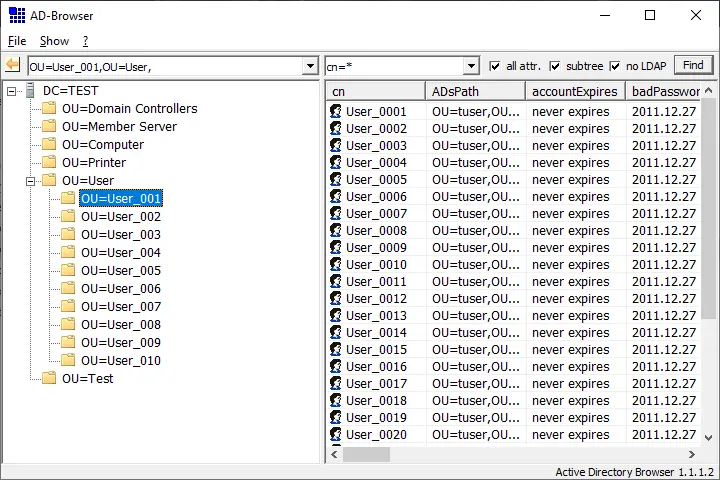
AD-Browserr english Version 1.1.1.4 (x64)
adbrowser.exe
adbrowser.cfg
adbrowser.chm
|

